Category: PowerShell

BSides Charm Presentation Posted: PowerShell Security: Defending the Enterprise from the Latest Attack Platform

This was my second year speaking at BSides Charm in Baltimore. Last year I spoke about Active Directory attack & defense and it was my first time speaking at a conference. 🙂 The presentation slides for my talk “PowerShell Security: Defending the Enterprise from the Latest Attack Platform” are now on the Presentations tab here …
Continue reading

Detecting Offensive PowerShell Attack Tools

At DerbyCon V (2015), I presented on Active Directory Attack & Defense and part of this included how to detect & defend against PowerShell attacks. Update: I presented at BSides Charm (Baltimore) on PowerShell attack & defense in April 2016. More information on PowerShell Security: PowerShell Security: PowerShell Attack Tools, Mitigation, & Detection The most …

Continue reading

PowerShell Version 5 Security Enhancements

PowerShell version 5 is RTM (As of 12/18/2015). Prior to this there was a “production preview” available since August which means it was supported, but not final. With the final release of PowerShell v5 now available, I highly recommend you download PowerShell v5 and start testing to prepare for production deployment. While the PowerShell v5 …

Continue reading

PowerShell Security: Execution Policy is Not An Effective Security Strategy – How to Bypass the PowerShell Execution Policy

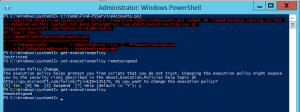
If you have worked with PowerShell recently, you may have run into an Execution Policy message: c:\temp\Find-PSServiceAccounts.ps1 : File C:\temp\Find-PSServiceAccounts.ps1 cannot be loaded because running scripts is disabled on this system. For more information, see about_Execution_Policies at http://go.microsoft.com/fwlink/?LinkID=135170. At line:1 char:1 + c:\temp\Find-PSServiceAccounts.ps1 + ~~~~~~~~~~~~~~~~~~~~~~~~~~~~~~~~~~ + CategoryInfo          : SecurityError: (:) [], PSSecurityException + FullyQualifiedErrorId : …

Continue reading

Windows Computer Primary Group IDs

Primary Group IDs are the RIDs for the Domain groups. The full list is here: Interesting Windows Computer & Active Directory Well-Known Security Identifiers (SIDs). 515 – Domain Computers 516 – Domain Controllers (writable) 521 – Domain Controllers (Read-Only) This information helps filter computer objects to return only the desired computer type. Domain Computers (Workstation …

Continue reading

PowerShell: Discover Active Directory Forest Domain Controllers

Recently I needed to find all Domain Controllers in a large Active Directory forest (and see the AD Domain Functional Level for each domain). Here’s the PowerShell code which leverages the Active Directory PowerShell module cmdlets.   import-module ActiveDirectory $ADForestInfo = Get-ADForest $ADForestInfoName = $ADForestInfo.Name $ADForestInfoDomains = $ADForestInfo.Domains $ADForestInfoForestMode = $ADForestInfo.ForestMode $AllDCs = $Null ForEach …

Continue reading

PowerShell Encoding & Decoding (Base64)

PowerShell provides an easy method for Base64 encoding and decoding. Encoding: $Text = ‘This is a secret and should be hidden’ $Bytes = [System.Text.Encoding]::Unicode.GetBytes($Text) $EncodedText =[Convert]::ToBase64String($Bytes) $EncodedText The result is this base64 encoded text: VABoAGkAcwAgAGkAcwAgAGEAIABzAGUAYwByAGUAdAAgAGEAbgBkACAAcwBoAG8AdQBsAGQAIABiAGUAIABoAGkAZABlAG4A Decoding: Decoding the base64 encoded blob using PowerShell is simple. $EncodedText = “VABoAGkAcwAgAGkAcwAgAGEAIABzAGUAYwByAGUAdAAgAGEAbgBkACAAcwBoAG8AdQBsAGQAIABiAGUAIABoAGkAZABlAG4A” $DecodedText = [System.Text.Encoding]::Unicode.GetString([System.Convert]::FromBase64String($EncodedText)) $DecodedText    

PowerShell: Find All Users in Active Directory the Optimal Way

Today I Learned (TIL) that the best way to find all users in Active Directory via LDAP query is to search for: (samAccountType=805306368) and NOT: (&(objectClass=user)(objectCategory=person)) Reference: http://www.selfadsi.org/extended-ad/search-user-accounts.htm

PowerShell 101: Easy Script Timing

There are times when you want to know how long it takes for a script to run. One of the Measure-* cmdlets can be useful, but there is a simpler way to time how long it takes to run a script (or piece of code). The StopWatch .NET method is an ideal method for script …

Continue reading

Owning Networks and Evading Incident Response with PowerShell

  PowerShell provides an easy method to bypass antivirus and other protection methods: Up until several months ago, I was a member of a penetration test team tasked with compromising data centers and evading detection. Industry standard tools such as Metasploit (an attack toolkit that includes a backdoor named Meterpreter) and Mimikatz (a password dumper) …

Continue reading

Load more