
I wrote a lengthy post on Kerberos earlier which describes the Kerberos protocol as well as how Active Directory leverages Kerberos. There are several interesting Active Directory components useful to the pentester. The one I cover here relates to how Kerberos works, specifically Service Principal Names. As I mentioned in my Kerberos post, Service Principal Names …
Category: Technical Reference
Sep 12 2014
Kerberos, Active Directory’s Secret Decoder Ring
Kerberos Overview Kerberos is a protocol with roots in MIT named after the three-headed dog, Cerberus. Named because there are 3 parties: the client, the resource server, and a 3rd party (the Key Distribution Center, KDC). Kerberos can be a difficult authentication protocol to describe, so I will attempt to simplify it as best as …
Sep 03 2014
Machine Account (AD Computer Object) Password Updates
There seems to be quite a bit of confusion when it comes to domain-joined computers and how/when they update their AD computer object (machine account) passwords. Here are a few key points on this process: The default domain policy setting configures domain-joined Windows 2000 (& up) computers to update their passwords every 30 days (default). …
Sep 01 2014
PowerShell Parameters
One of the most useful features in Powershell is Parameters. Microsoft has some excellent documentation on Powershell Parameters Some of my favorites: Default Parameter [Switch]$Enabled = $True Mandatory Parameter [parameter(Mandatory=$true)] [String]$Name Validate Parameter Options in a set [ValidateSet(“TCP”, “UDP”)] [string]$NewPortType Validate Parameter Options in a range (case INsensitive) [ValidateRange(1,65535)] [string]$NewPortNumber Add Parameter Aliases [alias(“PortScope”,”Scope”)] [string] …
Aug 30 2014
PowerShell: Drop (remove) the last character from a string
Drop (remove) the last character from a string: $ComputerName = ‘DCCOMP01$’ $ComputerName = $ComputerName.Substring(0,$ComputerName.Length-1) $ComputerName Result is “DCCOMP01″. This works especially well when the last character is a special PowerShell reserved one like “$”.
Aug 27 2014
Installing Kali Linux on Windows 8 Hyper-V
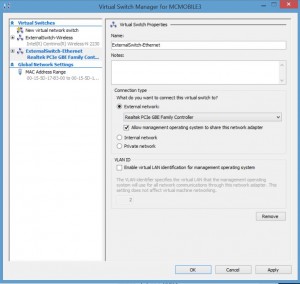
Installing Kali Linux on Windows 8 Hyper-V (Windows 8.1 includes improvements to the Hyper-V platform) Installing Hyper-V: Requirement: Windows 8 Pro or Windows 8 Enterprise which include Client Hyper-V. Requirement: Your computer processor must support virtualization technology (VT), though most processors in the past 5 years support VT (pretty much all Intel i-series processors, i3, …
Aug 25 2014
Microsoft Enhanced Mitigation Experience Toolkit (EMET) 5 Protection Methods
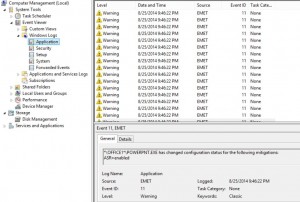
Microsoft Enhanced Mitigation Experience Toolkit (EMET) v5 security technology which I outlined in a previous post has several protection methods which will be detailed here. According to my sources at Microsoft 😉, EMET can be installed on workstations and servers (testing is always highly recommended before placing in production). Given the tremendous security improvements when …
Aug 20 2014
Microsoft EMET 5 Released
Microsoft’s EMET (Enhanced Mitigation Experience Toolkit) is a free download from Microsoft that enhances Windows security by preventing common malware and exploitation software methods. It does need to be well-tested before deployment, but there are several legacy Windows methods leveraged by malware to get into a system and take control. Installing EMET provides very strong protection …
Aug 15 2014
Removing an Orphan (inactive) Active Directory Domain
Removing an Orphan (inactive) Active Directory Domain One of my customers has a forest with several domains, one of which hasn’t been used in a while (call it domain “RedShirt”). The 2 Domain Controllers in the domain, “RedShirt” both tombstoned. Yes, I know, how does that happen? ALWAYS monitor your environment. Since the domain hasn’t …
Aug 06 2014
PowerShell: One-liners to Get You Started
Some of the scenarios covered in the blog post: The server rebooted recently – who did it and when exactly? Is there an easy way to see if KB2862152 is installed? I need to backup all of the GPOs in the domain every day What are the IP settings on my system(s)? What are the …
Recent Comments