
This series of posts focuses on key Active Directory (AD) components that need to be secured in order to ensure AD security is leveled up. In this post, we focus on Domain Controller configuration.
Tier 0
Domain Controllers need to be managed and maintained as Tier 0 servers since they handle authentication and authorization for the organization. Tier 0 being the highest tier that requires nothing outside of this be in the tier including users, groups, and computers. Only AD admins as Tier 0 accounts should be able to manage Domain Controllers. Any system outside of this is in violation of the Tier 0 principal whether it be management, inventory, security, or virtualization administration.
Supported Windows Version
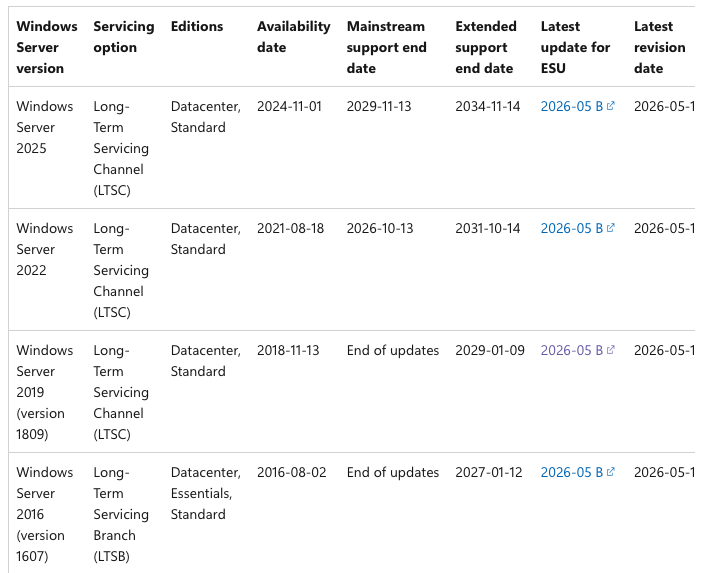
The first key item is ensuring that all Domain Controllers (DCs) are running on supported Microsoft Windows operating system versions. At this point, DCs should be running at least Windows Server 2019, preferably Windows Server 2022 or 2025. The table below shows that Windows Server 2016 & 2019 have ended mainstream support. Windows Server 2019 has extended support until January 2029.
Global Catalog Servers
In most environments, all Domain Controllers should be Gobal Catalog servers. While not a security item per se, this is best practice for DCs.
Domain Controllers that haven’t Rebooted in Months
We can track when Domain Controllers have last rebooted by looking at the lastlogondate in PowerShell. This number should be less than 45 days to ensure that they are being regularly patched.
Domain Controller Permissions & Owners
When a computer is created in AD, the account that creates the computer object retains some permissions on the computer object and becomes the default owner. If there is a service account that provisions new computers and joins them to the domain, this account will typically become the owner of the computer object. This is problematic since the owner of an object in Active Directory can change permissions on the object. When the computer object is a Domain Controller, this could cause a situation where a domain join service account has elevated privileges on Domain Controller computer objects. Furthermore, Domain Controller computer object permissions should be reviewed to ensure that only Tier 0 accounts and groups have elevated permissions.
There are several techniques which allows code execution on a computer when the attacker gains write privileges on a computer object.
Domain Controller Software
Few things impact the security posture of a Domain Controller like the software installed on it. For example, configuring a non-standard remote management tool can potentially open up access to the DC for accounts that aren’t AD admins. DCs should be treated like commodities and have the same configuration across all of them. This means software that manages agents shouldn’t be installed on DCs. Packages like Visual Studio and SQL Express shouldn’t be installed on DCs either.
A risk decision needs to be made around agents that provide the ability to install/run code. Strictly speaking, any management of Domain Controllers, including security software, should be maintained as strictly Tier 0.
Domain Controller Group Policy
I have an entire post that focuses specifically DC Group Policy here:
https://adsecurity.org/?p=3377

Recent Comments